Workbench / Tool 02 · OP 20 Nest
Nesting Yield Preview
Put the same parts on the same sheet two ways and see how much metal each layout uses.
Demo estimate, not a binding quote.
Layout comparison
Result · Demo
Inputs changed. Fix any highlighted field, then press Compare layouts.
Pick your parts and sheet, then press Compare layouts.
Assumptions used
- Pick parts to see the assumptions behind the result.
✓ You're on the list. We'll email you when there's something new to try.
How to read sheet utilisation
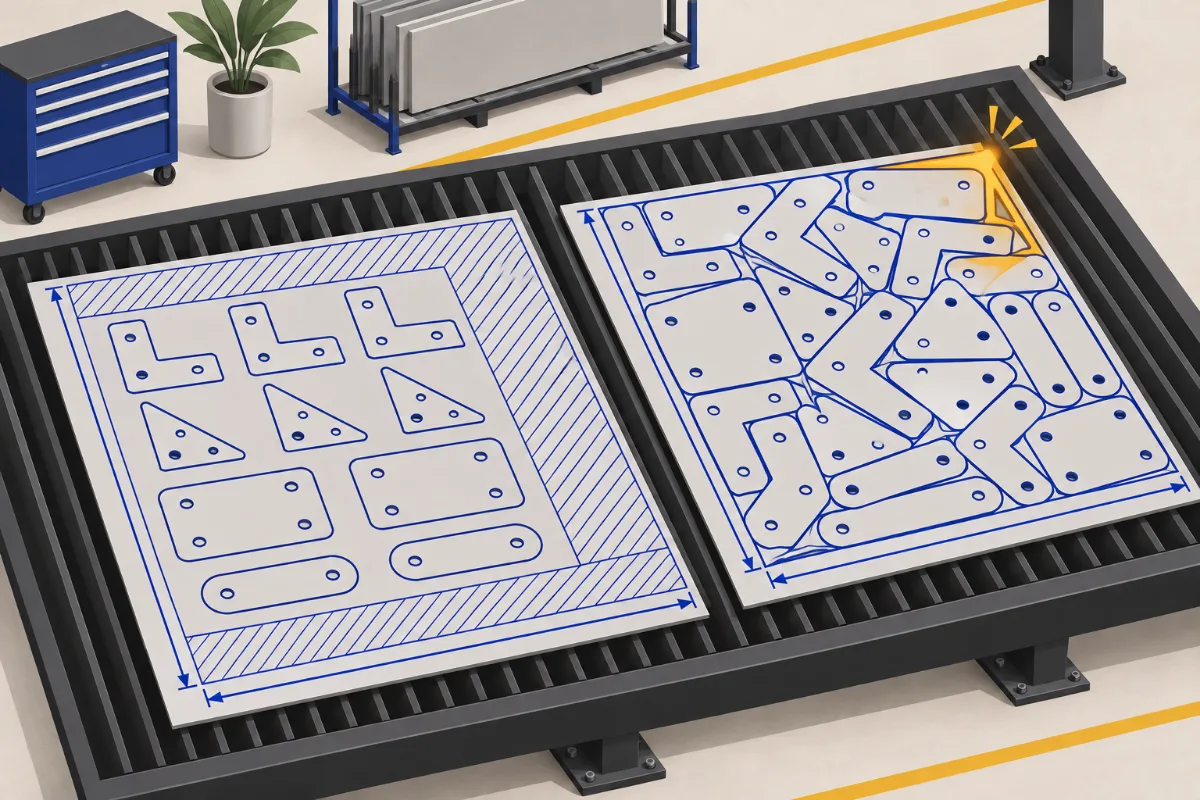
Scrap is a cost you pay before the first part is cut. If a layout uses 70% of a sheet, the other 30% is metal you bought and can't bill. This preview shows that number for a mix of parts, and shows how much a better layout can win back.
Two layouts, same parts
The basic grid gives each part type its own row and never rotates a part. It's the kind of layout you get when nobody has time to nest. The optimised layout sorts parts from largest to smallest and places each one as far down and to the left as it fits. It turns parts 90° when that helps. Both layouts use your sheet size and spacing.
What you get
For each layout, the tool counts the parts placed, the sheets used and the material utilisation. Full sheets count in full; on the last sheet, the strip above the nest is treated as a reusable remnant. The tool also shows the gap between the two layouts in percentage points. When the optimised layout doesn't do better for your mix, it says so plainly. A tighter layout doesn't always beat a simple grid.
Deterministic by design
The same inputs always give the same layout, so you can change one thing (sheet size, spacing, a quantity) and see exactly what that change does.
Its limits
This is a preview, not production nesting. It packs bounding boxes, not true part shapes, so real nesting software that handles contours, common-line cutting and parts inside holes can often do better. Check any production layout in your CAM software before you cut.
Sheet sizes
Presets cover common metric (1250 × 2500 mm, 1500 × 3000 mm) and imperial (48 × 96 in, 60 × 120 in) sheets. You can also enter a custom size. To turn the sheet count into money, price a part in the Quote Estimator; to check the hours, use the Shop Schedule Planner.