About · Platform
About OptiFab
OptiFab Technologies offers smart quality control and process analytics for additive manufacturing and 3D printing. Our main focus is the job shop: laser, plasma, waterjet and press-brake work, where margin is won or lost on the quote, the sheet and the schedule.
Our mission
Fab shops lose margin in two quiet places: quotes that are slow or off, and metal that goes into the scrap bin. Both are easier to fix when you can see the numbers behind them.
Our mission is to put those numbers in front of the people who price, cut and promise the work, in hours, kilograms and sheets.
What OptiFab does, and for whom
OptiFab is a shop-floor workbench in the browser. Its three working tools, the Quote Estimator, the Nesting Yield Preview and the Shop Schedule Planner, need no sign-up, and nothing you type leaves the page.
It is for owners, estimators and production managers at job shops in English- and Spanish-speaking markets, and for hardware startups and makers who order custom metal parts.
One view from quote to inspection
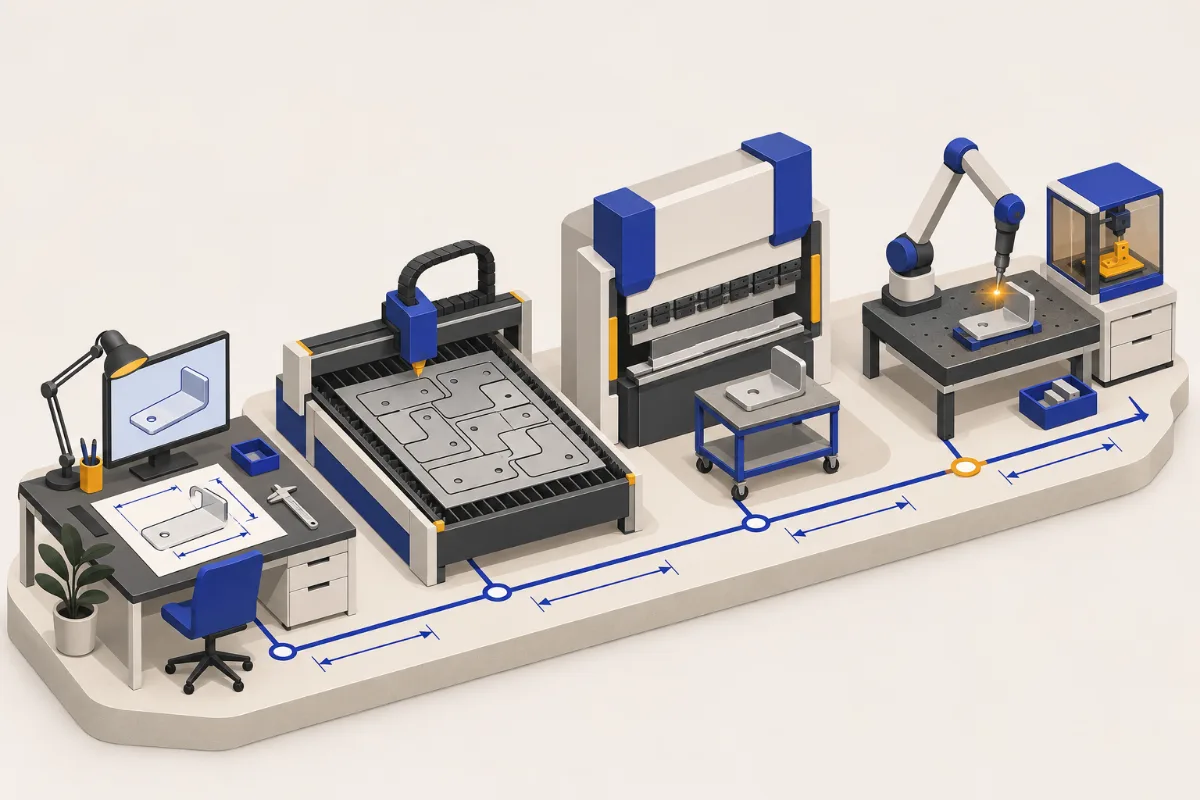
A job's margin is set in four places: the quote, the nest, the machine and the inspection. When you can see all four in one view, it's clear where the money goes.
-
OP 10 · QUOTE
Quote
A quote is a list of assumptions: material weight and price, cut speed, pierce count, bends, setup. OptiFab puts every one of them on screen as a line item. If a number looks wrong, you can see which assumption caused it and change it.
Try it today: Quote Estimator → -
OP 20 · NEST
Nest
How parts sit on the sheet decides how much metal you buy for each part you sell. OptiFab shows material utilisation and sheets used, so the scrap cost appears before the sheet is cut, not after.
Try it today: Nesting Yield Preview → -
OP 30 · CUT & BEND
Cut & bend
Cut time, pierces, bend time and setup are where machine hours go. OptiFab measures them in hours per machine, so you can compare them with what the quote assumed and with what the schedule can hold.
Try it today: Shop Schedule Planner → -
OP 40 · INSPECT
Inspect
Quality control closes the loop. When parts are checked against what was planned, the gaps (extra scrap, longer cuts, rework) become numbers you can feed into the next quote.
Also built for additive and 3D-printing cells
Shops that run additive and 3D-printing cells next to their cutting and bending work fall within the same quality control and process analytics. A dedicated tool for additive work, such as build-plate packing, is on our list for later.
What's available today
OptiFab is in early access. Today you can use the three tools for free in your browser. Deeper process analytics is on the roadmap, and early-access members hear about it first.
How we work
Show the maths
Every result lists the assumptions behind it.
Your numbers, not ours
Rates and capacities are editable, because every shop is different.
Plain language
Shop-floor English now, and Spanish next. Metric and imperial units side by side.
Honest status
We're in early access. Tool results are demo estimates, and we say so on every result.